

Leaderboard
-
Bruce Willis
Администраторы4Баллы5 595Число публикаций

Popular Content
Showing content with the highest reputation on 16.06.2019 in all areas
-
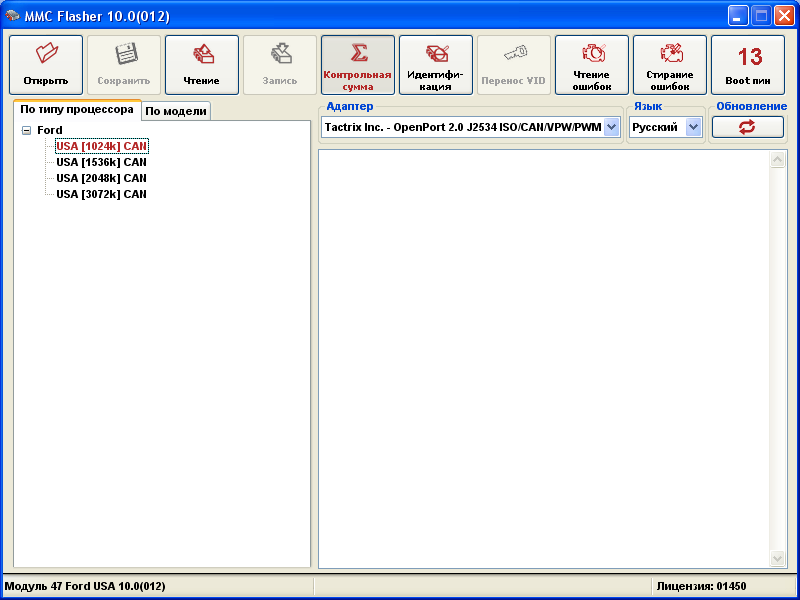
1 pointЧтение/запись калибровок Проверка/корректировка контрольной суммы Чтение/Удаление ошибок Перенос VID блока При программировании данных блоков управления используется бут пин (FEPS) - это 13 пин обд разъема. Поддерживаются следующие блоки: M799G PCM170F PCM150F PCM190F Meg9.8.1 Размер читаемой области варьируется и может быть 1024К, 1536K 2048К, 3072K и определяется автоматически. Ford Explorer, 3.5L Cyclone V6 Petrol TIVCT (USA) Ford Explorer, 3.5L Cyclone V6 Petrol TI-VCT Ford Mondeo 5 2.5L Duratec (110kW/150PS) (126/171PS) Ford Mustang 4.6L (2005-2009) Ford Fusion 2.5L 2013 Duratec (110kW/150PS) (126/171PS) Ford Focus 2.0 2006+ 2.0L Duratec HE (137PS) Ford Fusion/Mercury/Milan 2.3L 2006+ (FoMoCo M799G) Duratec-HE (145PS) - MI4 Ford Explorer/Mountaineer 4.0L 2008 V6 12V SOHC EFI Mazda CX9 3.7L (FoMoCo M799G) c 2009+ Ford 2010 F150 / Mark LT 4.6L 3V V8 Ford Escape 2.5l EV4A-14C204-AF Kuga 2013+ 2.5L Duratec (110kW/150PS), 6-ступенч. автомат AT RU LHD FWD, Передат.число главной передачи 3,51 Кнопка "Перенос VID" теперь работает как переключатель. По умолчанию она включена(те нажата), при записи предварительно вчитывается VID блок и копируется в записываемую прошивку.
 1 point
 -
1 point
-
1 pointНичего там отдельно подавать не надо , просто вставить опен порт 2.0 в колодку обд1 point