

Leaderboard
-
f13nd
Администраторы3Баллы241Число публикаций -
Bruce Willis
Администраторы2Баллы5 597Число публикаций


Popular Content
Showing content with the highest reputation on 11.06.2021 in all areas
-
1 pointRequest send to email support(dog)mmcflash.ru (dog) = @ 1) Information about Auto (Engine, year, transmission type, model etc) 2) License (dongle) number 3) Photo ECU with lable 4) Photo connector ECU Don't write from hotmail, we can't answer1 point
-
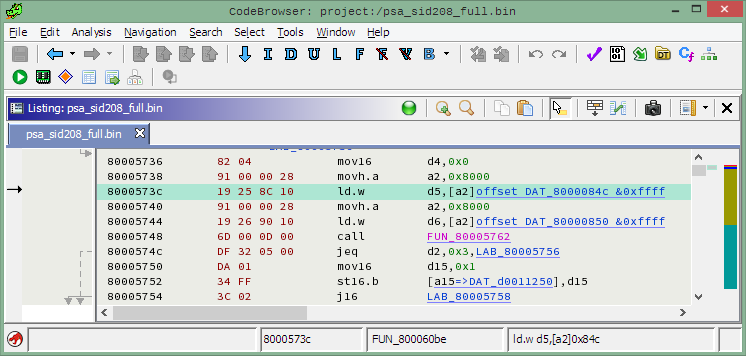
1 point35й модуль не знает где пароль (внезапно!), он читает флеш и ищет в нем сигнатуру приведенной выше функции. В ломаной иде копаться необязательно, с 1 марта появилась бесплатная гидра, если кто-то простых путей не ищет, может за 2-3 вечера сделать трикор модуль к ней (это возможно) и копаться там.
 1 point
 -
1 pointКонечно как, возьмите скопируйте пароль да найдите его в любом Hex редакторе и перенесите, загрузчик ориентирован на чип тюнинг. Если для вас это сложно, то смените работу.1 point
-
1 point
-
1 pointПо 0x0000084C 8 байт, но он не обязан быть именно там. У форд SID208 несколько возможных вариантов. Самый надежный способ в IDA Pro прошивку загрузить по базе 0x80000000 (проц Infineon Tricore), ткнуть C в первый байт (0x80000000) и найти конструкцию вроде этой: ROM:80005736 mov16 d4, #0 ROM:80005738 movh.a a2, #@HIS(dword_8000084C) ROM:8000573C ld32.w d5, [a2]@LOS(dword_8000084C) ROM:80005740 movh.a a2, #@HIS(dword_80000850) ROM:80005744 ld32.w d6, [a2]@LOS(dword_80000850) ROM:80005748 call32 sub_80005762 ROM:8000574C jeq32 d2, #3, loc_80005756 ROM:80005750 mov16 d15, #1 ROM:80005752 st16.b [a15], d15 ROM:80005754 j16 loc_800057581 point