Перейти к контенту
View in the app

A better way to browse. Learn more.

MMCFLASH

A full-screen app on your home screen with push notifications, badges and more.

To install this app on iOS and iPadOS
  1. Tap the Share icon in Safari
  2. Scroll the menu and tap Add to Home Screen.
  3. Tap Add in the top-right corner.
To install this app on Android
  1. Tap the 3-dot menu (⋮) in the top-right corner of the browser.
  2. Tap Add to Home screen or Install app.
  3. Confirm by tapping Install.

Leaderboard

Popular Content

Showing content with the highest reputation on 22.09.2024 in all areas
  1. 1 point
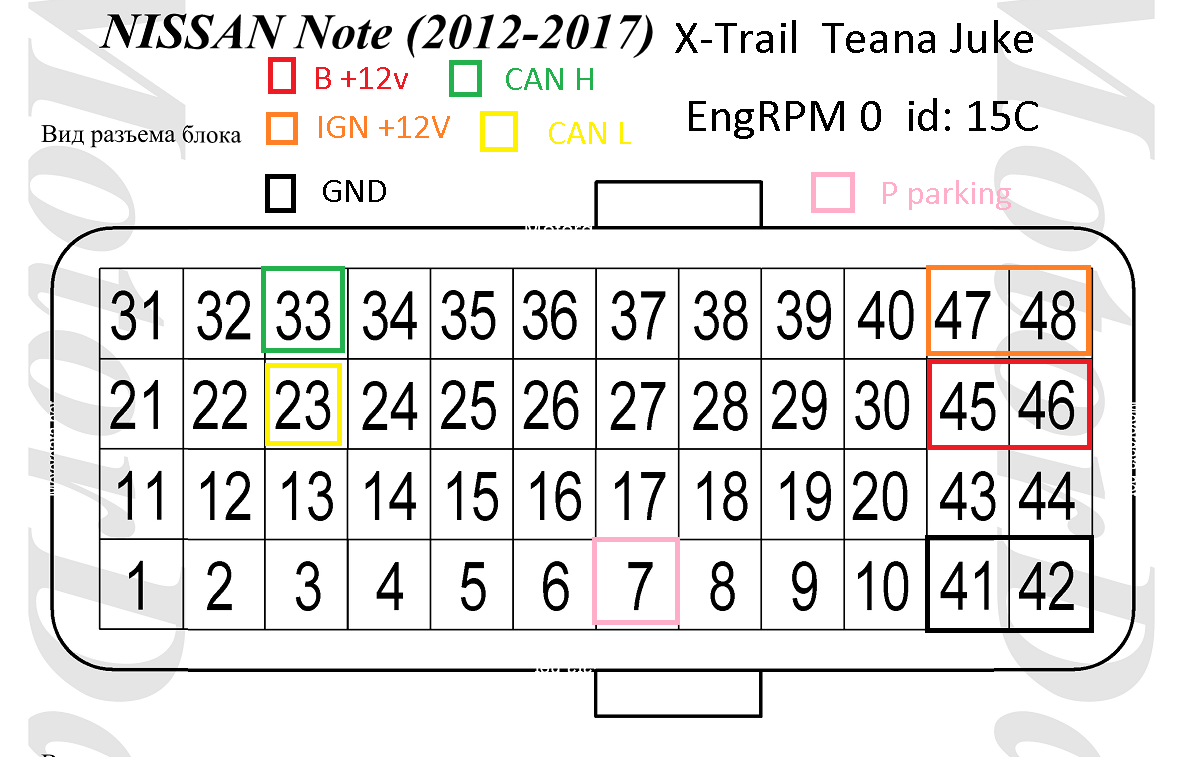
    Трейс в авто X-Trail T32 Xtrail t32 .trc
  2. 1 point
    На днях ради интереса ковырял блоки XTrail T32, Note, Teana на процах 72531, калибры читает, а фул ни шиша. Это защита от дурака или еще не добавлены в поддерживаемые? BEA21 100N EngRPM 0 15c.trc
  3. 1 point
    На столе помимо парковки нужно плюнуть в Can id: 15C

Account

Navigation

Поиск

Поиск

Configure browser push notifications

Chrome (Android)
  1. Tap the lock icon next to the address bar.
  2. Tap Permissions → Notifications.
  3. Adjust your preference.
Chrome (Desktop)
  1. Click the padlock icon in the address bar.
  2. Select Site settings.
  3. Find Notifications and adjust your preference.