


afulmer29
Пользователи
-
Регистрация
-
Последнее посещение
-
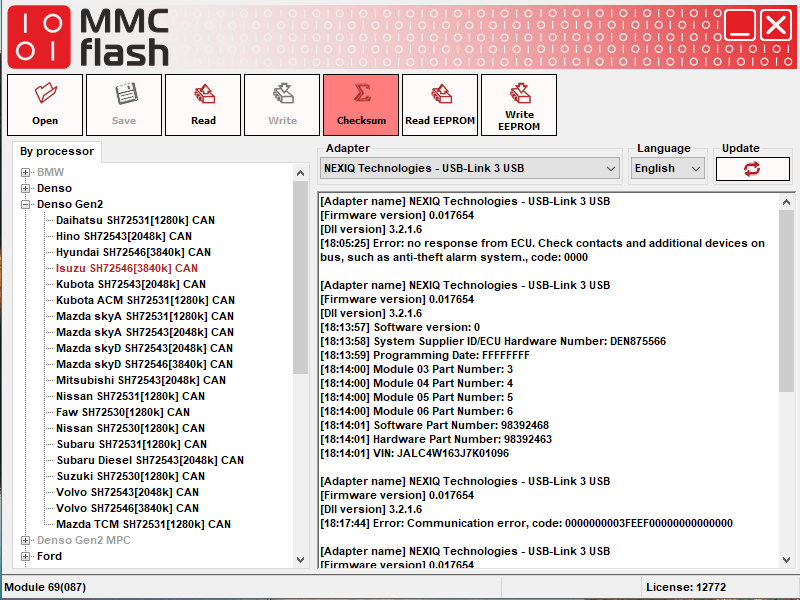
I first tried to read through 16-pin OBDII but i cannot get it to read. Its a 2018 Isuzu NPR with 3 plug denso GEN2. I have Module 69(087) and idk if i have pinout wrong but i cannot get it to read. So i pulled ECU and now have it on bench. im unsure if i have it pinned correctly, but i can get it to see module with device tester and also identify in mmc flash with a different module number. It also it asks to key off with master switch but i do not have a switch or know which pin is for key off/on. any advice would be great or proper pinout possibly. Also maybe i need special harness? i am also using USB link 3 which supports J2534. I can get it read ecm info under the Denso SH7059 (Module 82 section) but i know 1536k is not correct size for this ecu. Here is what it identifies under Denso SH7059 CAN (Which is wrong): [Adapter name] NEXIQ Technologies - USB-Link 3 USB [Firmware version] 0.017654 [Dll version] 3.2.1.6 [18:13:57] Software version: 0 [18:13:58] System Supplier ID/ECU Hardware Number: DEN875566 [18:13:59] Programming Date: FFFFFFFF [18:14:00] Module 03 Part Number: 3 [18:14:00] Module 04 Part Number: 4 [18:14:00] Module 05 Part Number: 5 [18:14:00] Module 06 Part Number: 6 [18:14:01] Software Part Number: 98392468 [18:14:01] Hardware Part Number: 98392463 [18:14:01] VIN: JALC4W163J7K01096 Here is when i try to read with correct module 82 [Adapter name] NEXIQ Technologies - USB-Link 3 USB [Firmware version] 0.017654 [Dll version] 3.2.1.6 [18:05:25] Error: no response from ECU. Check contacts and additional devices on bus, such as anti-theft alarm system., code: 0000 Any ideas on what im doing wrong? Possibly get correct pinout, or what adapter is needed? Thank you
.thumb.jpg.55f5406be95b86439da6adc5bfde010f.jpg)
.jpg.6ef125241e16dd50e68840f9436ef0bc.jpg)