

Перейти к контенту
View in the app

A better way to browse. Learn more.

MMCFLASH

A full-screen app on your home screen with push notifications, badges and more.

To install this app on iOS and iPadOS
  1. Tap the Share icon in Safari
  2. Scroll the menu and tap Add to Home Screen.
  3. Tap Add in the top-right corner.
To install this app on Android
  1. Tap the 3-dot menu (⋮) in the top-right corner of the browser.
  2. Tap Add to Home screen or Install app.
  3. Confirm by tapping Install.

streettuned.remap

Пользователи
  • Регистрация

  • Последнее посещение

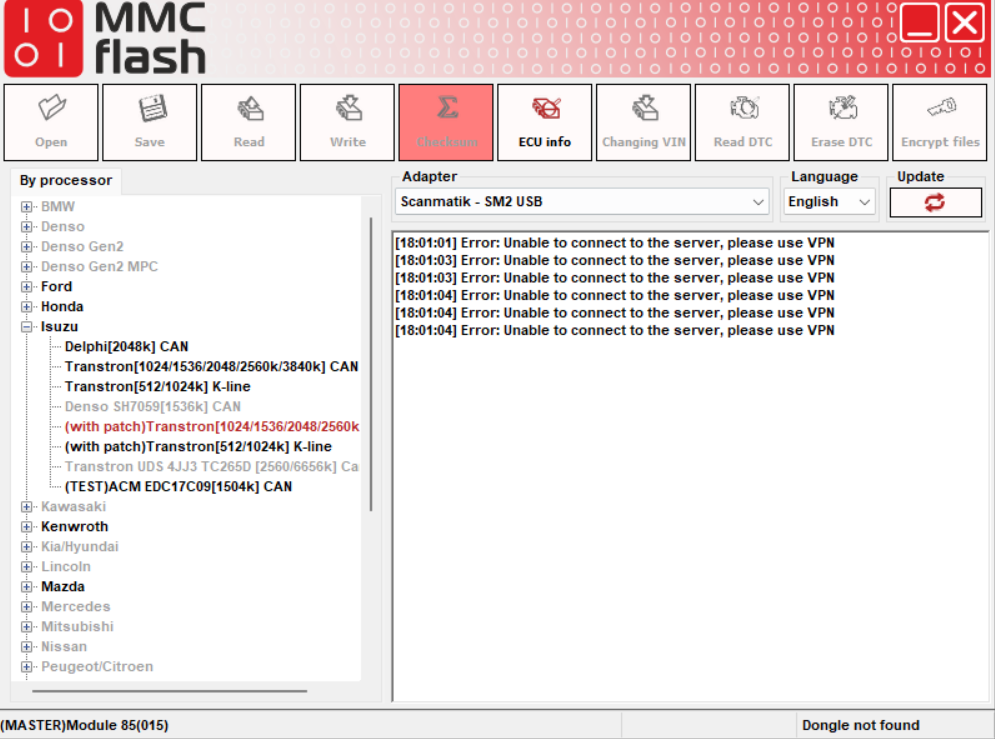
  1. It seems there’s a problem with my MMC Flash when I use module 85 (MASTER) for Isuzu. I can no longer use module 85 because the error message says: “Error: Unable to connect to the server, please use VPN.” I also tried using a different laptop, but the same issue still appears with the same error message. even u click the update and this error always show. bandicam 2025-09-25 17-49-21-175.mp4
Account

Navigation

Поиск

Поиск

Configure browser push notifications

Chrome (Android)
  1. Tap the lock icon next to the address bar.
  2. Tap Permissions → Notifications.
  3. Adjust your preference.
Chrome (Desktop)
  1. Click the padlock icon in the address bar.
  2. Select Site settings.
  3. Find Notifications and adjust your preference.