

Перейти к контенту
View in the app

A better way to browse. Learn more.

MMCFLASH

A full-screen app on your home screen with push notifications, badges and more.

To install this app on iOS and iPadOS
  1. Tap the Share icon in Safari
  2. Scroll the menu and tap Add to Home Screen.
  3. Tap Add in the top-right corner.
To install this app on Android
  1. Tap the 3-dot menu (⋮) in the top-right corner of the browser.
  2. Tap Add to Home screen or Install app.
  3. Confirm by tapping Install.

peteralc506

MMC User
  • Регистрация

  • Последнее посещение

Весь контент пользователя peteralc506

  1. 10-2010
  2. возможно ли Приветimmo off ecu 1860B310 Pajero 4 3.2
  3. тема форума ответил на Bruce Willis автора peteralc506 в For English Users
    hello bruce I register well and now I can not enter user and mail says not correct and that they are already registered I do password renewal and does not recognize help please
  4. тема форума ответил на Bruce Willis автора peteralc506 в Описание Модулей
    HI bruce module in test? beta testers?
  5. тема форума ответил на Bruce Willis автора peteralc506 в Описание Модулей
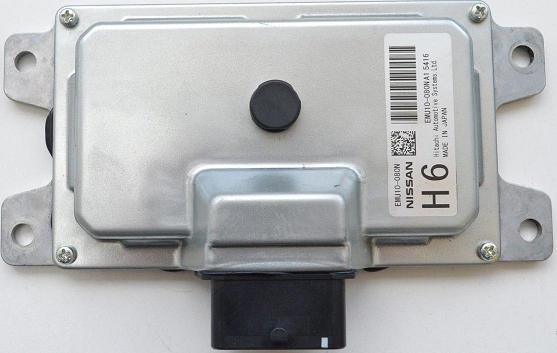
    Hello and sorry I have an original TCM scheme there are two possible connections it is not any of these this car is model f15 juke the connector has different pinout someone has pinout?
  6. тема форума ответил на Bruce Willis автора peteralc506 в Описание Модулей
    Привет, BRUCE У меня есть оригинальная схема tcm pinout есть два соединения это не TCM JUKE PINOUT.pdf
  7. тема форума ответил на accent автора peteralc506 в For English Users
    thanks bruce
  8. тема форума ответил на accent автора peteralc506 в For English Users
    Hi Admin unable to download files? MMC Flash user. nº 2243 ECUTools.EU. Thanks
  9. тема форума ответил на Bruce Willis автора peteralc506 в Описание Модулей
    привет несколько выводов tcm juke 1.5dci 2010 Благодарю вас
Account

Navigation

Поиск

Поиск

Configure browser push notifications

Chrome (Android)
  1. Tap the lock icon next to the address bar.
  2. Tap Permissions → Notifications.
  3. Adjust your preference.
Chrome (Desktop)
  1. Click the padlock icon in the address bar.
  2. Select Site settings.
  3. Find Notifications and adjust your preference.