

Перейти к контенту
View in the app

A better way to browse. Learn more.

MMCFLASH

A full-screen app on your home screen with push notifications, badges and more.

To install this app on iOS and iPadOS
  1. Tap the Share icon in Safari
  2. Scroll the menu and tap Add to Home Screen.
  3. Tap Add in the top-right corner.
To install this app on Android
  1. Tap the 3-dot menu (⋮) in the top-right corner of the browser.
  2. Tap Add to Home screen or Install app.
  3. Confirm by tapping Install.

Bartas222

Пользователи
  • Регистрация

  • Последнее посещение

  1. тема форума ответил на Bartas222 автора Bartas222 в For English Users
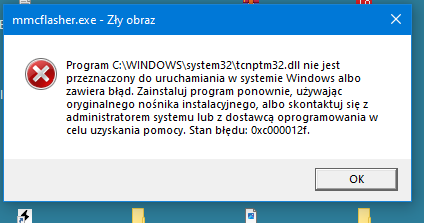
    I apologize for posting in Polish, but this is the message I get when starting MMC flash.
  2. тема форума ответил на Bartas222 автора Bartas222 в For English Users
    Can someone share this pinout?
  3. тема форума ответил на Bartas222 автора Bartas222 в For English Users
    So can I ask him?
  4. тема форума ответил на Bartas222 автора Bartas222 в For English Users
    Do you have a pinout for this driver? I just ordered the MMC flash today.
  5. тема форума ответил на Bartas222 автора Bartas222 в For English Users
    This is a '98-'99 Carisma. And can I read it normally using the car's OBD? Openport? or Scanmatic?
  6. тема форума ответил на Bartas222 автора Bartas222 в For English Users
    I would be grateful for any answers
  7. Hello everyone, does any module support these ECUs? MH7201F MD355869 E2T68375

Account

Navigation

Поиск

Поиск

Configure browser push notifications

Chrome (Android)
  1. Tap the lock icon next to the address bar.
  2. Tap Permissions → Notifications.
  3. Adjust your preference.
Chrome (Desktop)
  1. Click the padlock icon in the address bar.
  2. Select Site settings.
  3. Find Notifications and adjust your preference.