regul8r
Пользователи
-
Регистрация
-
Последнее посещение
-
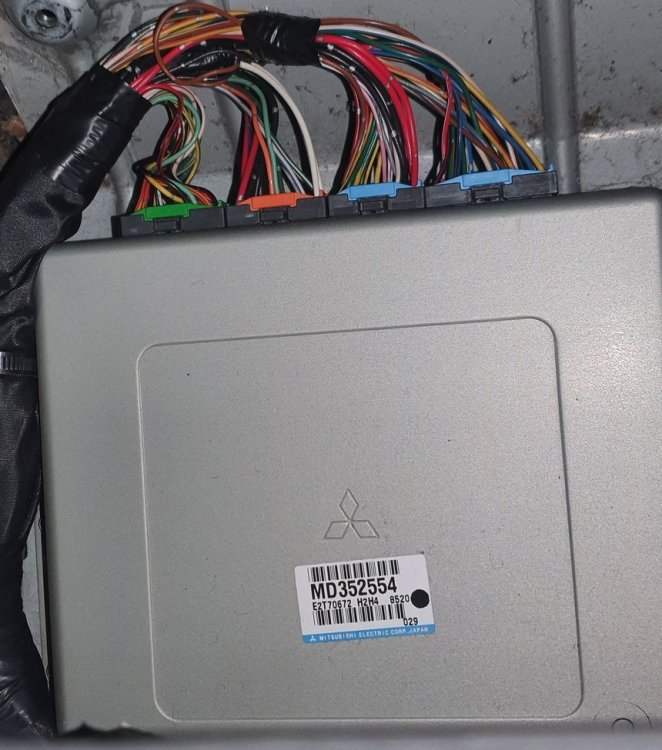
Hi Im looking to purchase definitions for my car. My car is a 1998 mitsi RVR Rom id 21000012 I have partial definitions but things are missing.
-
I have partial maps for the rvr x3 im not skilled enough to finish them you can adjust a few maps. of note the mitisuibishi evo 5 rom dumps straight into the ecu and will run the engine but the transmission runs in limp mode. you can find my posts below on the evom forum. Of note the automatic gearbox is only rated for 330hp 510 foot pounds of torque or you will brake it. xml for 1998 RVR x3 4g63t - Page 2 - EvolutionM - Mitsubishi Lancer and Lancer Evolution Community 1998 rvr auto ecu tuning. - EvolutionM - Mitsubishi Lancer and Lancer Evolution Community you can program wih an openport 2.0, I have been un successfull to read or program the gearbox.
-
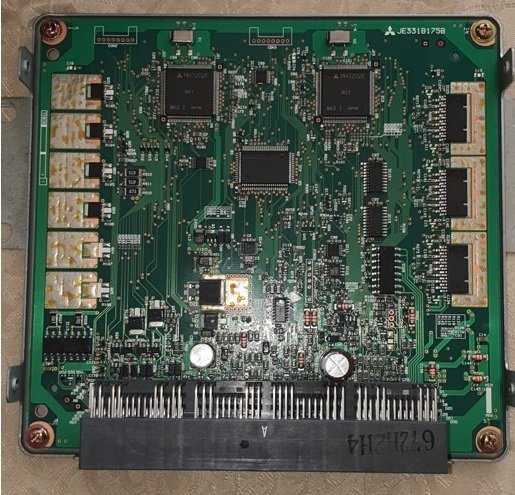
I have a 1998 Mitsubishi RVR that has an ECU with two 7202f processors one for ECU and one for TCU. I have successfully read the engine rom and then went to read the transmission rom but with no luck. i have moved the boot pin from pin 26 to pin 27 on the Datalink connector as outlined here: https://www.evoscan.com/technical-vehicle-manuals/12-mitsubishi-diagnostics But I'm getting the below error in Ecuflash and I'm wondering if i would be able to dump the TCU rom with MMCflash if I was to purchase it? sending init sequence 2 got 0x10 response instead of 0x11 sending init sequence 3 entering bootloader sending kernel size (2029) error sending kernel size interface close